![rp_master_logo-lanscape-yellow-white-1.png]](https://kb.shieldsafety.co.uk/hs-fs/hubfs/rp_master_logo-lanscape-yellow-white-1.png?height=40&name=rp_master_logo-lanscape-yellow-white-1.png)
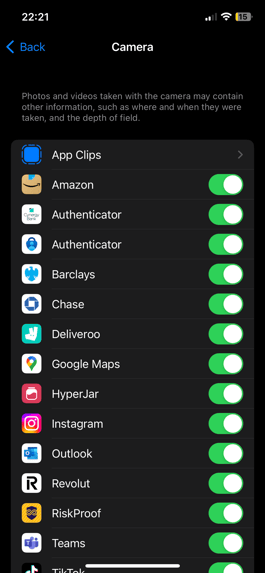
- Settings > Privacy and Security > Camera > RiskProof: Turn on
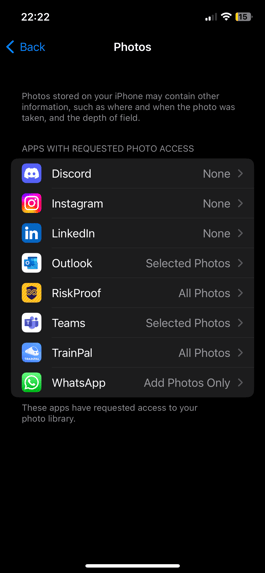
- Settings > Privacy and Security > Photos > RiskProof: All photos
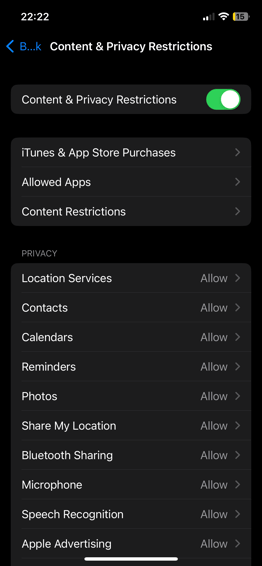
- Settings > Screen Time > Content & Privacy Restrictions > Photos > Allow Changes
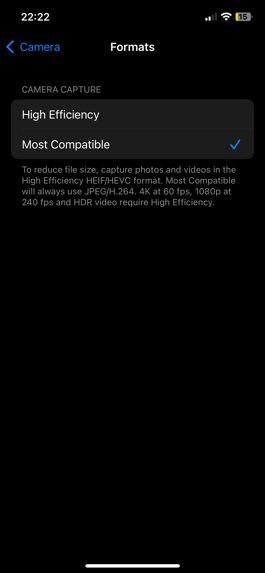
- Settings > Camera > Formats > Most Compatible
If you have tried all of the above and are still having issues, please contact app support at customerservices@shieldsafety.co.uk