
How does it work?
The QR Code answer type allows checklist creators to configure questions that can only be answered by scanning a QR code. This ensures that checks are performed at the correct location, for example, confirming that a fire door inspection is completed at the actual fire door.
Key Benefits
- Confirms location-based checks: Adds an extra layer of verification to your compliance processes.
- Prevents fraudulent completions: Users must be physically present to scan the QR code.
Using the QR Code answer type
Requires you having existing QR Code generation processes set up outside of Riskproof.
- Create a QR code; customer creates outside of Riskproof (third party QR code generators)
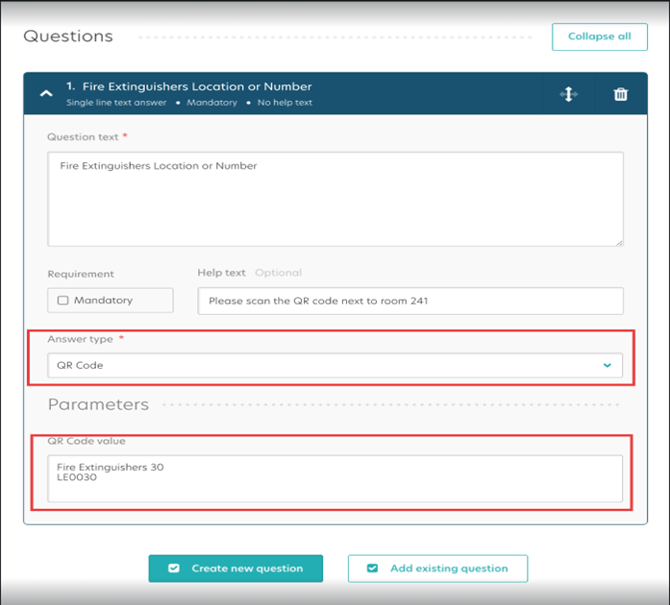
- Configure your checklist question to use the QR Code answer type.
- Riskproof > Monitoring > Manage Checklist > Create question
- Add the QR code value (the encoded text) to the question.
- Save and assign the checklist.
- Complete all mandatory fields
- On the Riskproof Mobile App/Web
-
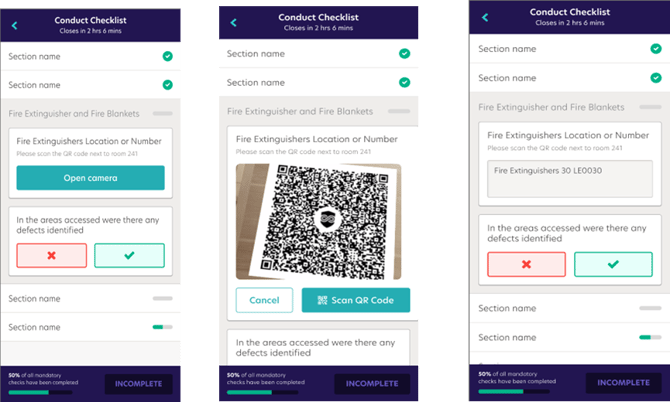
- select the checklist
- Navigate to the QR code question
- Select the Open Camera button
- Target the camera onto the QR code
- Scan the code to complete the answer
Important Notes
- Use of the QR Code answer type will require ability to generator QR codes from a third party.
- A QR Code question configured with a value requires an exact match scanned to answer the question
- A QR Code question configured without a value will accept any QR code.
- QR code scanning is available in the App and Web
Why this matters?
Previously, checklist items could be completed without visiting the actual location, which posed compliance risks and undermined trust in the results. By introducing QR code verification, we’re ensuring that users are present at the required site, significantly improving the quality and reliability of monitoring data.