
Before you start:
- You must have View Training Records permission assigned to your user role.
- Colleagues must be created in RiskProof, with a valid email, and assigned a Training Plan with eLearning courses.
Training Colleagues will appear on the Manage Colleagues page and the Training Plan that has been assigned to them will be displayed. However, they have not yet been enrolled onto any of the courses within that Training Plan.
Follow the below process to enrol colleagues to their eLearning courses.
Steps
- Navigate to Records
- Select the location for the Colleague you want to enrol on a course.
- Choose the name of the Colleague
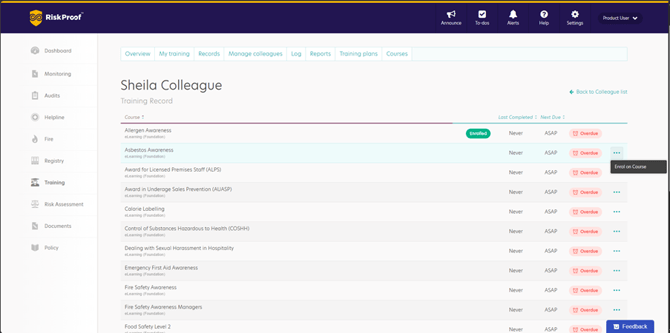
- Select the ellipsis next to the name of the eLearning course you want to enrol the colleague onto
- Click ‘Enrol on Course’
Colleagues without an Email address
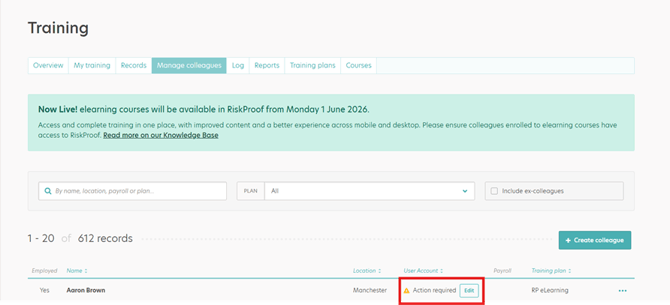
Within Manage Colleagues, you can easily identify a Colleague that has not yet been assigned an email address by looking down the User Account column.
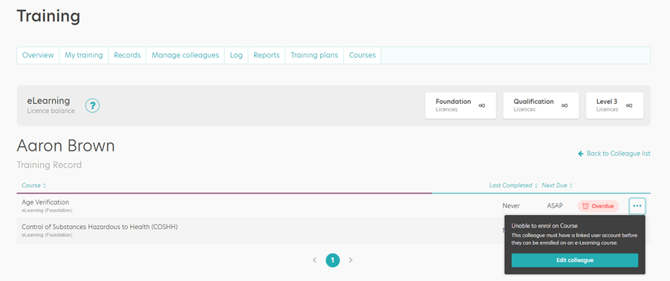
If you try to enrol a Colleague onto a course when they do not have an email account, you will not be able to enrol them on the course and will be prompted to edit the Colleague account.
What happens next?
The Colleague will be enrolled on the course.
Enrolling a colleague onto a course will consume an eLearning licence
When the Colleague logs into RiskProof, the course will be available for them to complete.
A Colleague can be enrolled onto any number of courses within their Training Plan by repeating the above steps. Each enrolment will consume a licence.