
Overview:
On-Demand Checklists are checklists that can be created and completed whenever required, without being tied to a recurring schedule. Once created and assigned to a location, they are available for users to complete on an ad hoc basis, making them ideal for one-off tasks and additional checks.
How it Benefits You:
- Greater flexibility – Complete checklists whenever they are needed.
- No scheduling required – Checklists can be conducted without being assigned to a specific date or time.
- Saves time – Create a checklist once and reuse it whenever required.
- Always available – Assigned locations can access and complete the checklist as needed.
- Supports ad hoc tasks – Ideal for unexpected checks, one-off activities, or tasks that don't require a regular schedule.
Who can create an On-demand Checklist?
Only users with both View Manage Checklists and Modify Checklists permissions can create and assign On-Demand Checklists.
How do I create an On-demand Checklist?
- Navigate to the Manage Checklists page
- Click on the ‘Create Checklists’ button
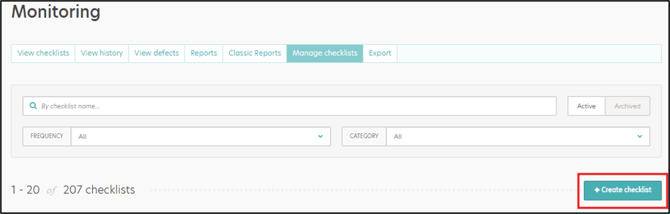
- Enter Checklist Name
- Select a Category
- Select the ‘On-demand’ Frequency from the dropdown list
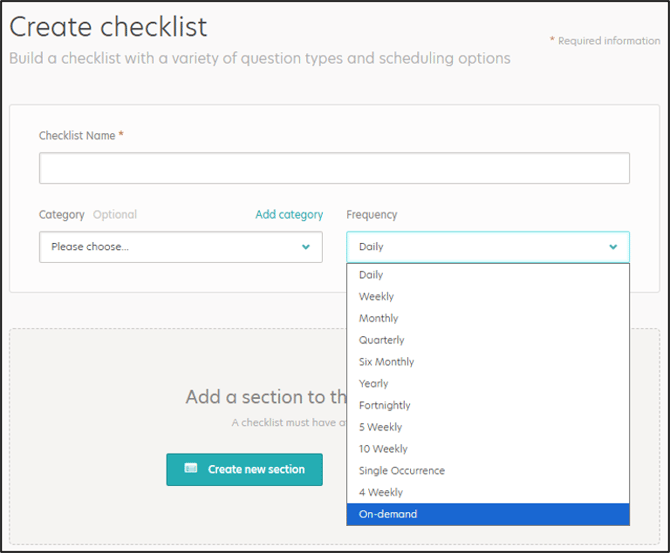
- Add the Sections and Questions
- Assign the checklist to a Location
-
Save the Checklist
The video below provides step-by-step guidance on how to create and conduct an on-demand checklist on the web app:
Important Notes
- As On-Demand Checklists are not linked to a schedule, the scheduling section of the Checklist Builder is hidden when the 'On-Demand' frequency is selected