
How do these new reports benefit me?
- Broader visibility: Quickly understand where cases are being raised across locations at a glance.
- Near real time information -unlike the old classic reports our new reports refresh information every 20 minutes
- Trend awareness: Simple charts show month-by-month changes and emerging case types.
- Focus attention where it matters: Clearly shows which areas experience the highest volume of cases.
- Identify patterns: Compare case trends across locations to build a clearer picture of performance.
- Reinforce accountability: Transparent ownership supports consistent and timely case management.
How do I access the new style ‘Health and Safety’ report?
- Navigate to the Helpline Module
- Click on the ‘Reports-Beta’ tab
- Click on ‘Health and Safety’
- Click on the ‘Cases’ tab
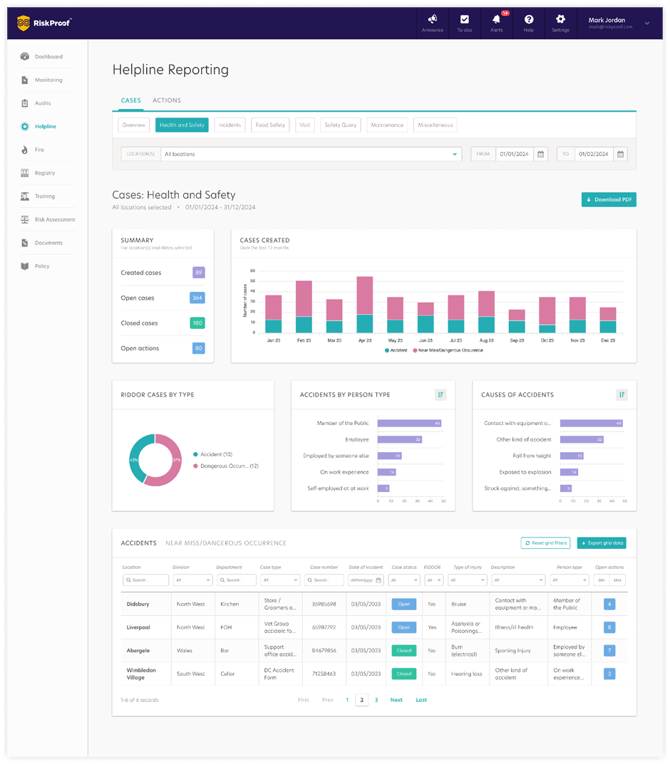
‘Health and Safety’ Report Breakdown
Page Level Filtering:
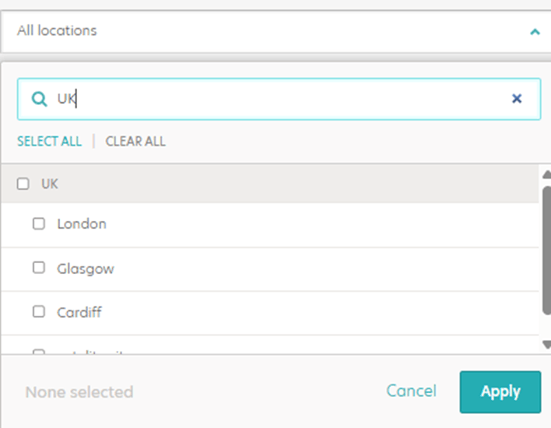
- Location: The ‘Health and Safety’ report defaults to display data for all locations you have access to. You can narrow your focus using the Location Selector filter, charts and data grids update immediately reflecting data based on the chosen location(s).
- Date Range: The ‘Health and Safety’ report displays data for the last 30 days, counted back from the current day. To pick a start and end date of your choosing in the From and To fields, with a maximum range of up to five years. Once applied, all charts and tables update to reflect the selected timeframe, except for the Cases Created chart, which always displays the last 12 months.

Special note:
The report now displays each case based on its status during the selected dates.
E.G. if a case is currently closed but was open within your chosen dates, it will appear as Open in the report. This ensures that the data reflects the accurate historical status of each case for the period you are analysing.Data Charts:
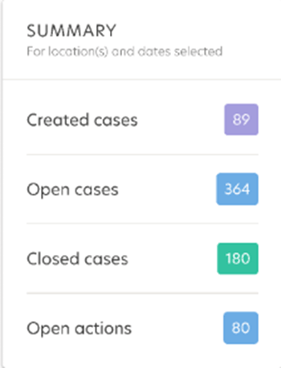
- Summary – These figures display the total number of created cases, Open cases, Closed cases and Open actions giving you a quick snapshot of overall case activity from the date range selected.
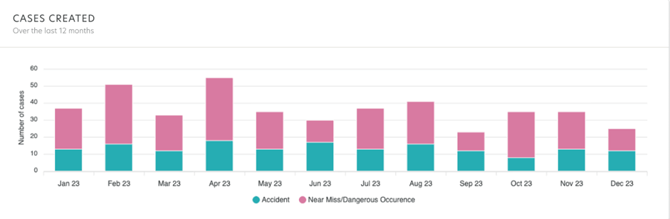
- Cases Created: A 12-month stacked bar chart with the number of health and safety cases by status each month by case types.
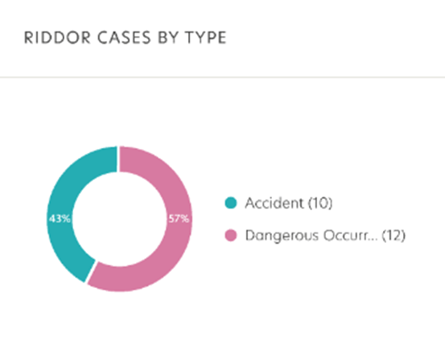
- Riddor by case type: This card provides a clear visual breakdown of all RIDDOR cases by case type, helping users quickly understand how RIDDOR incidents are distributed across different case types.
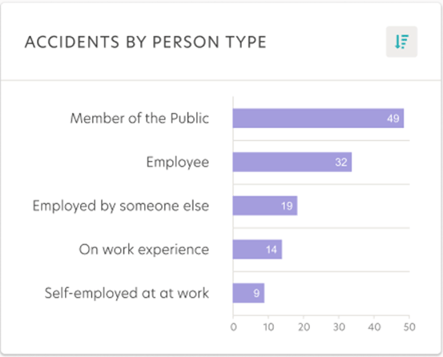
- Accidents by person type: This card highlights the top five person types involved in reported accident case, with a sort option to view the top five or bottom five types
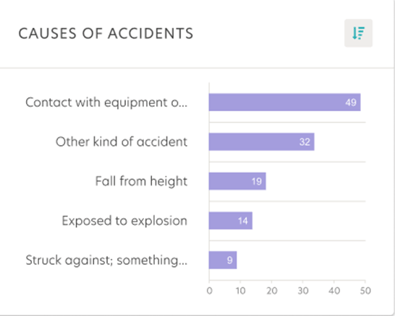
- Causes of Accidents: This card highlights the top five causes of accidents recorded across all accident case types with a sort option to view the highest or lowest causes.
Data Grids on screen display
-
Whether you're looking for further insights or sharing information across teams the, ‘Export Data' button, will export the data currently displayed in the tabular data grid and receive the output of your report in a convenient CSV file format allowing for further analysis and offering flexibility with ease of use.
Accidents:
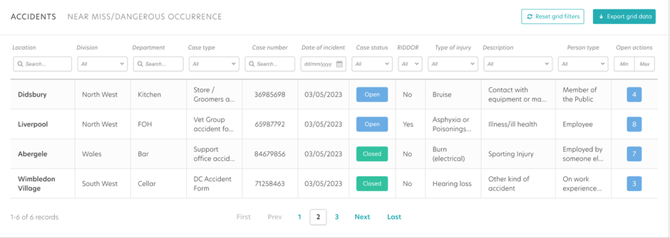 The ‘Accidents’ data grid provides a detailed view on the page:
- Recorded accident cases,
- Case type,
- Incident date,
- RIDDOR status,
- Injury type,
- Person involved.
Want more information ?
Additional information is provided if you extract the table which includes:
- Type of incident,
- Body part affected,
- Type of disease,
- Result of incident,
- Date and time created
- Case created by
- Date and time modified
- Last modified by
Near Miss/Dangerous Occurrence on screen display
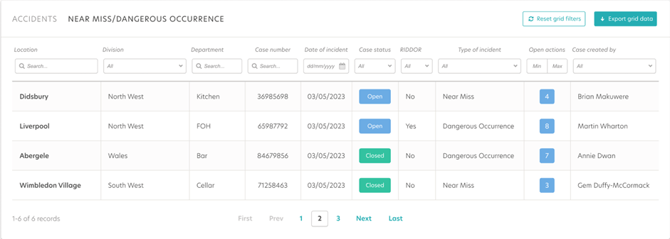
The Near Miss / Dangerous Occurrence data grid provides a clear view of all reported near misses and dangerous occurrences cases, including:
- Case number
- Date of Incident
- Case Status
- Type of Incident
- Open actions
- Case created by
Want more information?
Additional information is provided if you extract the table which includes:
- Date and time created
- Time of incident
- Case created by
- Date and time modified
- Last modified by
Download and Export
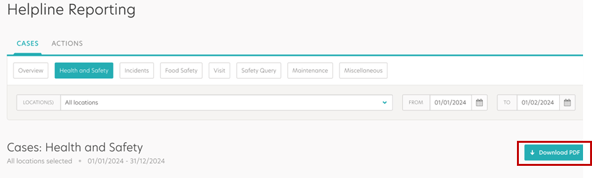
The addition of the 'Download PDF' button gives the ability for you to capture a comprehensive snapshot of the current page, including charts and graphs. By simply clicking this option, you can generate a PDF file, ready for sharing, further analysis or archival. This is designed to eliminate the need for manual creation of charts based on information available in Riskproof saving time.
Classic report phase out information
The reports will be rolled out in phases into BETA and made available to everyone to play with and use and feedback. Classic reports will remain available during this period.
After a period of one month when all reports have been released to BETA classic report access will be removed.
We encourage users to start using the new reports now to familiarise themselves with the enhanced functionality ahead of a future transition.
What’s Next?
Over the coming quarter we will be releasing the following helpline reports :
- Food Safety
- Incidents
- Visit
- Safety Query