
Overview
The new Scores Compare view enables users to compare overall audit scores, scorebands and section‑level performance across two selected audit rounds. This update has been designed to support performance tracking over time and to make it easier to understand where improvements have been made or where additional focus is required.
How it Benefits You:
- Performance Trends
Compare two audit rounds side‑by‑side, helping you quickly identify improvements or declines in key performance indicators.
- Stronger Decision‑Making
Changes in scores are displayed clearly, allowing you to focus attention where it is most needed.
- Improved Transparency
Historic audit scores, scorebands and compliance ratings are presented in one consolidated grid, making trend analysis straightforward.
Scores Compare Page Breakdown
Page-Level Filtering
- Location: Upon accessing the page, the ‘Compare’ report, the Location(s) filter’s default selection is all your accessible locations. You can narrow your focus using the Location Selector search filter, allowing for quick customisation.
- Audit Round: The 2 drop-down filters for audit rounds (A & B) enables you to – Select the audit rounds you wish to compare before data is loaded on the page

Location Overview
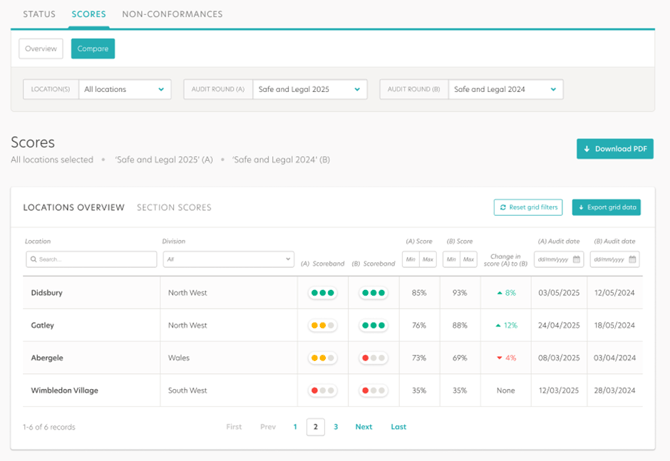
The Location Overview grid compares overall scores for each location across two selected audit rounds. It displays the current and previous scores, the change between rounds, and the corresponding audit dates. Page-level filters for Locations and Audit Rounds (A & B) dynamically update the grid, enabling comparison across historical results. This allows users to quickly identify performance improvements or declines at a location level.
Section Scores
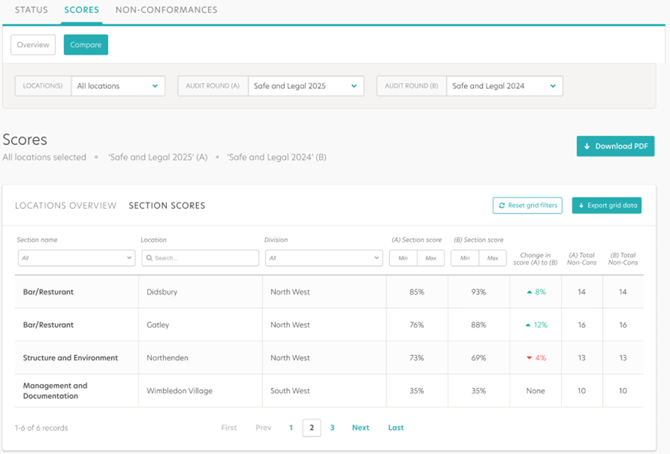
The Section Scores grid compares performance by audit section across two selected rounds for each location. It displays section scores for both rounds, the variance between them, and the total non-conformances recorded. Page-level filters for Locations and Audit Rounds (A & B) dynamically update the grid, enabling comparison across historical results. This helps pinpoint which operational areas have improved and which require attention.
Download & Export
- The addition of the 'Download PDF' button provides a quick way to capture the entire report in a convenient PDF format. This function eliminates the need to manually create or compile visual data, saving time for further analysis or distribution.
- The 'Export Data' button enables easy export of the grid's information into a CSV file, allowing for deeper data analysis or integration with other reporting tools.
Important Notice:
As part of this release, the following Classic reports will be retired and will no longer be available:
- Section Scores for All Locations
- Total Score for All Divisions
- Total Score for All Locations
You can access the new suite of reports via the Reports tab, which provides equivalent and enhanced functionality.